Ability to Map Multiple Credit Card Issuer Codes Sent from ACRS for a Card Issuer in Stay
The Stay - ACRS integration is enhanced to allow users to associate multiple codes sent for a credit card issuer from ACRS with the card issuer configured in Stay. When reservations are booked through ACRS using credit cards, the credit card details which include the card issuer codes are sent to Stay.
ACRS supports multiple codes to be configured for a card issuer. For example, the codes, VI, VS, and VA can be configured for the VISA issuer in ACRS. When the same card type is used to book different reservations, multiple card issuer codes are sent for the reservations from ACRS to Stay. Through this enhancement, users can configure the codes associated with a card issuer type in ACRS, in Stay, and add the payment method details to reservations.
Permission
The following new permission must be assigned to use this feature.
-
Stay_CreatePaymentMethodMappingCode: Users with this permission assigned can view and update the credit card issuer codes sent from ACRS that are configured for a card issuer in Stay.
This permission is assigned to the following roles by default:
-
Stay Administrator
-
Stay Accounting
-
Stay Hotel Manager
Configuration
To support this enhancement, a new tab, Payment Method Setup, has been added to the Amadeus Central Reservation System (ACRS) section of the Interface Mapping tab in the Cloud Settings screen (Interfaces ➜ Cloud Settings ➜ Interface Mapping). This tab allows users to associate the multiple codes sent for a credit card issuer from ACRS with the card issuer configured in Stay. This tab is displayed only to users with the Stay_CreatePaymentMethodMappingCode permission assigned. Users without the permission assigned cannot view or modify the card issuer codes configured.
To associate a code with a credit card issuer, users must click the Add hyperlink. When clicked, a new row is displayed that allows users to enter the card issuer code details for the fields displayed in the following columns:
|
Column |
Description |
|---|---|
|
Card Issuer |
This is a mandatory single-select drop-down list that displays the active credit card issuers available in the Guest Accounting screen in Stay. By default, this field is displayed blank. Users can select the preferred card issuer. Once a card issuer is selected, it is no longer displayed for selection again in the drop-down list the next time users click the Add hyperlink. Even when the card issuer type was selected previously and marked as Inactive, it will not be displayed for selection again. |
|
Active |
This flag is enabled by default. Users must enable this flag to configure codes for active card issuers. |
|
Code |
This is a mandatory field that allows users to configure a unique code for a card issuer. This field accepts a minimum of 2 and a maximum of 25 characters, which includes alphanumeric and special characters. Users cannot enter duplicate codes. |
|
Primary |
Users can select the primary code for a card issuer by selecting this radio button for the preferred code. An information icon has been added to this column that displays the following message when hovered upon: By default, the primary code will be used in the outbound messages to the interface. Only one code can be selected as the primary code for a card issuer. By default, the first code is selected as primary. |
|
Action |
Users can configure multiple codes for a card issuer by clicking on the add icon (+). This icon is displayed in the last row of each code configured for a card issuer. A maximum of 20 codes can be configured for a card issuer. Once the maximum limit is reached, the add icon is no longer displayed. The code configured for a card issuer can be deleted using the delete icon (-). The code marked as primary cannot be deleted. In this case, users must mark a different code as primary and then delete the code. |
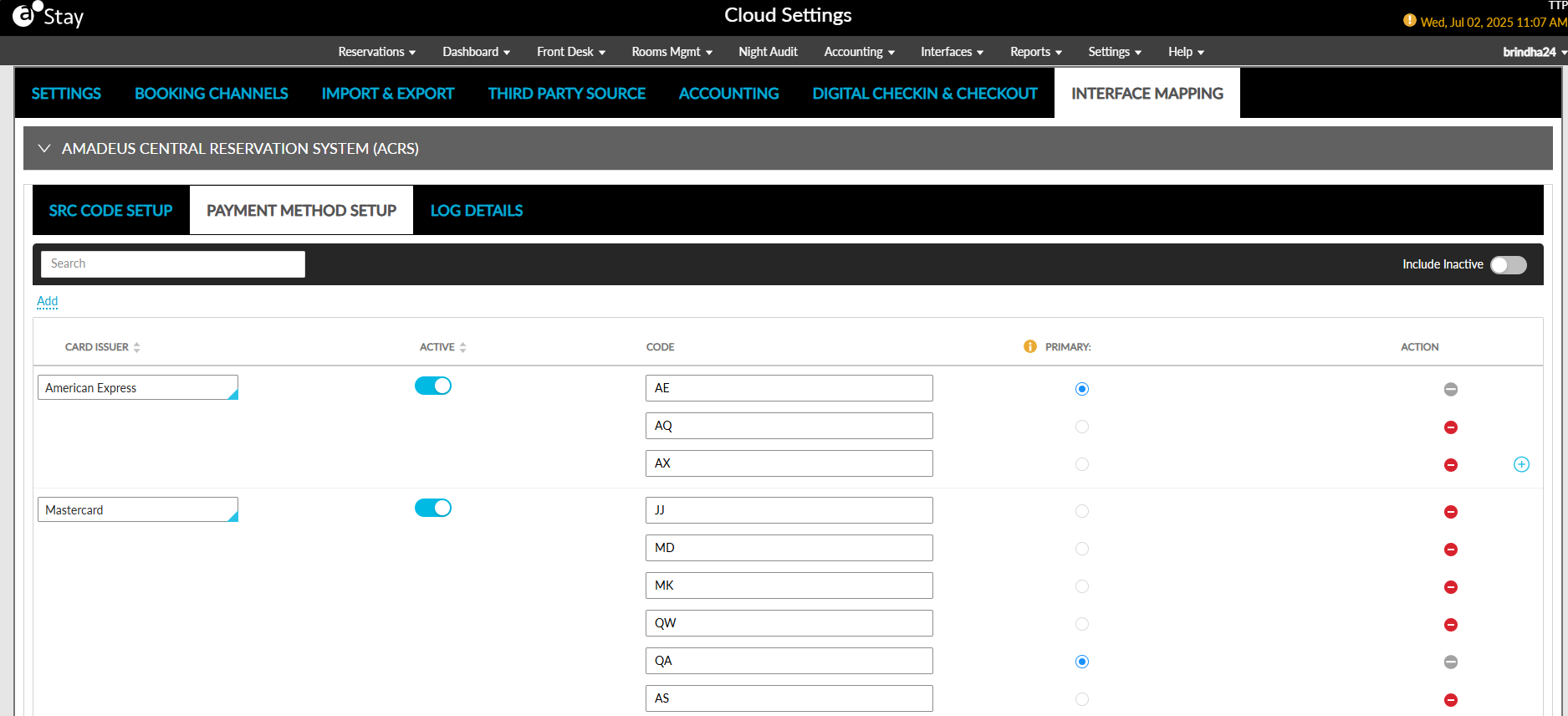
Once the values are configured, the Save button is enabled for selection. When clicked, the codes configured for a card issuer are saved. Users can search for a record using the card issuer’s name and code. By default, the card issuer types marked as inactive are not displayed. The Include Inactive flag must be enabled to view the card issuers marked as inactive.
Whenever users modify the details configured for a card issuer, a record is created in the Audit Log screen (Reports ➜ Audit Log).
Add Payment Method Details to Reservations
When reservations are booked using credit cards through ACRS and sent to Stay, the payment method details sent for the reservation is first validated in Stay. The payment method code sent for the reservation is compared against the card issuer codes configured in the Payment Method Setup tab. When the code matches the code configured for a card issuer, the card issuer details are added to the reservation and displayed in the Payment Methods section.
When the code received is not configured in the Payment Method Setup tab, the code is compared against the code configured for the card issuer types in the Guest Accounting screen (Guest Accounting ➜ Payment Methods). When the code matches, the payment method is added to the reservation.
When the received code does not match the codes configured in both the Payment Method Setup tab and the Guest Accounting screen, the reservation is created in Stay with Cash as the primary payment method.
Send Payment Method Details of Reservations
When an outbound message is sent from Stay to ACRS for a reservation associated with a credit card payment method, the card issuer code available in the reservation is compared against the codes configured for a card issuer in the Payment Method Setup tab. When the card issuer is available, the code marked as primary is sent from Stay to ACRS.
When the card issuer is not configured in the Payment Method Setup tab, the code is compared against the code configured for the card issuer types in the Guest Accounting screen. When the code is available, the card issuer details are sent for the reservation from Stay to ACRS.
Send/Receive Primary Credit Card Code of the Card Issuer
The Stay - ACRS integration is enhanced to store the credit card details of reservations sent from ACRS in the reservations in Stay.
Details Received from ACRS
The code of the credit card payment method sent from ACRS is compared against the payment method codes available in the Payment Method Setup tab of the Cloud Settings screen (Interfaces➜Cloud Settings➜Interface Mapping➜Payment Method Setup).
-
When a code matches any of the codes available for the card issuer in Stay, the card details are added to the reservation in Stay.
-
When the code does not match, it is compared against the payment method codes available in the Payment Methods tab of the Guest Accounting screen (Settings➜Guest Accounting➜Payment Methods).
-
When the code matches, the card details are added to the Folios section of the reservation in Stay.
-
-
When the code does not match in either of the screens, the Cash payment method is marked as the default payment method for the reservation.
Details Sent from Stay
When an outbound message is sent from Stay for reservations created through ACRS that have credit card as their primary payment method, the respective card issuer is searched in the Payment Method Setup tab in Stay.
-
When the card issuer is available in this tab, the code marked as Primary for the issuer is sent from Stay to ACRS.
-
When the issuer is not available in the Payment Method Setup tab, the issuer is searched in the Payment Methods tab of the Guest Accounting screen and the code configured for the issuer in this tab is sent for the reservation from Stay.